 Talenox
 We’re halfway through 2025! And while this quarter’s update might seem a little lighter than usual, the features we’ve rolled out are incredibly impactful for payroll teams, especially those in Hong Kong and Singapore.
Before we dive in, a huge shoutout to our engineering team for making these updates happen behind the scenes. From building eMPF compatibility to supporting new bank formats, they’ve been hard at work improving the way you manage payroll so thank you!
Now, let’s jump into what’s new this quarter:
🇭🇰 eMPF Submission is Now Live for Hong Kong Users!
We’ve officially rolled out support for eMPF CSV file generation in Talenox! 🎉
This makes it much easier for Hong Kong users to comply with the new eMPF Platform requirements for MPF contribution submissions.
You can now generate an eMPF-ready file directly from your payroll data in Talenox which means no more manual formatting or guessing how the file should look.
To enable eMPF, head over to your Company > Profiles page and scroll down to Payroll Details. From there, you’ll be able to switch on the eMPF Submission toggle and enter the necessary information like your eMPF Scheme and Payroll Group ID. Here’s a guide on how to set it up step by step.
Once payroll has been processed, you can go to Month Total, click Export Bank Payments/MPF, select eMPF > CSV, and generate your submission file in just a few clicks. We’ve got a guide for that too.
For companies managing multiple MPF employee groups with different eMPF details, you can use Cost Centres to assign unique group IDs and schemes to employees. During file generation, you’ll just select the relevant Cost Centre to download a version of the file tailored to that group. More on managing eMPF across multiple MPF groups here.
This feature is all about giving you more control and less admin work -- especially during submission crunch times.
🇸🇬 Now Supporting Aspire Bank Files in Singapore
If you’re using Aspire FT Pte. Ltd. for payroll payouts, we’ve got good news -- Talenox now supports Aspire bank file generation! 🙌
This means you can now generate a bank file that’s fully compatible with Aspire’s GIRO batch upload system. No formatting errors, no extra conversions -- just a smoother payout process.
To set this up, go to Company Details > Bank Details in your Talenox account. Select Aspire FT Pte. Ltd. from the dropdown menu, then fill in your bank account details like this:
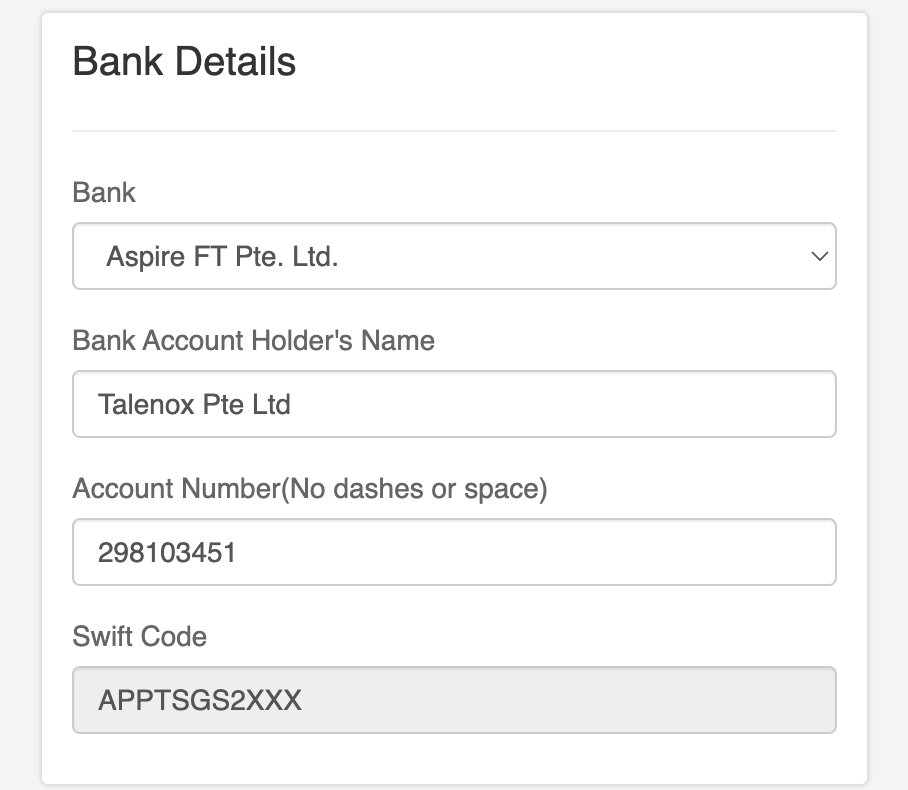
Once you’ve processed your payroll for the month, go to Month Total, download the Aspire-compatible file, and upload it to your Aspire dashboard via GIRO.
Not sure how to do that? Check out our step-by-step Aspire submission guide here.
It’s a small change but it removes friction and makes payday just that little bit smoother.
What’s Coming Next?
We’re keeping things focused and impactful this quarter, but don’t worry, we’ve got plenty lined up for the second half of the year.
Here’s a sneak peek of what we’re working on behind the scenes:
- New integrations with more HR and banking partners
- Smarter automation for payroll and employee onboarding
- Better reporting tools to help you make sense of your data
- More features designed specifically for Malaysia (yes, we’re listening!)
We’re also working on more subtle UX improvements to streamline your everyday processes and reduce clicks where they don’t need to be.
Need Help?
Whether you’re setting up eMPF, switching to Aspire, or just need a quick walkthrough, our friendly support team is always just a message away.
You can chat with us or email us directly at support@talenox.com -- we’ve got you covered.
That’s all for now -- but stay tuned. Big things are coming.
Related posts:
 Important: Talenox Pricing Changes Starting Today (January 5, 2026)05th Jan 2026
- EPF, SOCSO, EIS & PCB: Complete Malaysian Payroll Compliance Outsourcing Guide29th Dec 2025
- How to Pay Your International Employees with Talenox's Multi-Currency Payment Feature07th Aug 2024
- Talenox Q1 2024 Updates: Automated features and more!15th Apr 2024
- New Pricing Plans, Annual Discounts, and a Sleeker Billing Dashboard28th Nov 2023
- Talenox Q3 2023 Updates: Streamlining Employee Management and Payroll12th Oct 2023