 Talenox
 At Talenox, we’re always looking for ways to improve your HR and payroll experience. We’re always thrilled to introduce updates that not only simplify your workflows and enhance compliance but also strengthen the security of your data.
One of our biggest milestones this quarter? Talenox is now ISO 27001:2022 certified! This certification reflects our dedication to maintaining the highest international standards for information security, so you can trust us to keep your data safe.
From automating SOCSO contributions in Malaysia to refining CPF proration for Singapore PRs, these updates are designed to make managing payroll smoother and more efficient. And, of course, none of this would have been possible without our incredible engineers--thank you for bringing these ideas to life! Let’s dive into the details.
1. SOCSO Contributions: Now Fully Automated (For Malaysian Users)
Good news for our Malaysian users! Managing SOCSO contributions just got a whole lot easier. Whether your employees are under 60, over 60, local, or foreign, Talenox now handles SOCSO calculations automatically--no manual adjustments needed.
Here’s how it works:
For Local Employees
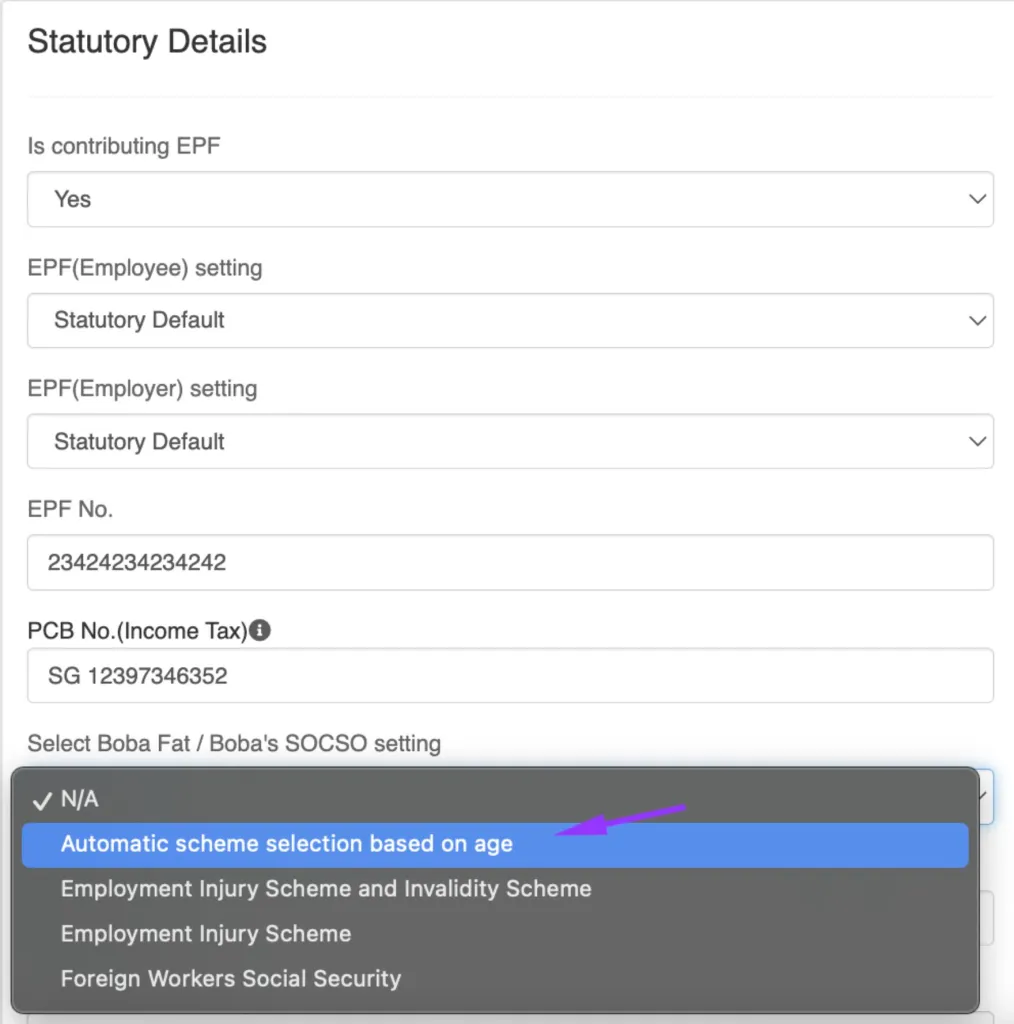
If you’re managing Malaysian employees, SOCSO contributions will now be automatically calculated based on their age. All you need to do is make sure their Date of Birth is filled in correctly, and Talenox will take care of the rest.
What You Need to Do
- Head over to the employee’s profile in Talenox and open the Statutory Details section.
- Under SOCSO Contribution, select Automatic scheme selection based on age.
- That’s it--SOCSO calculations will now adjust automatically as the employee’s age changes.
For Foreign Employees
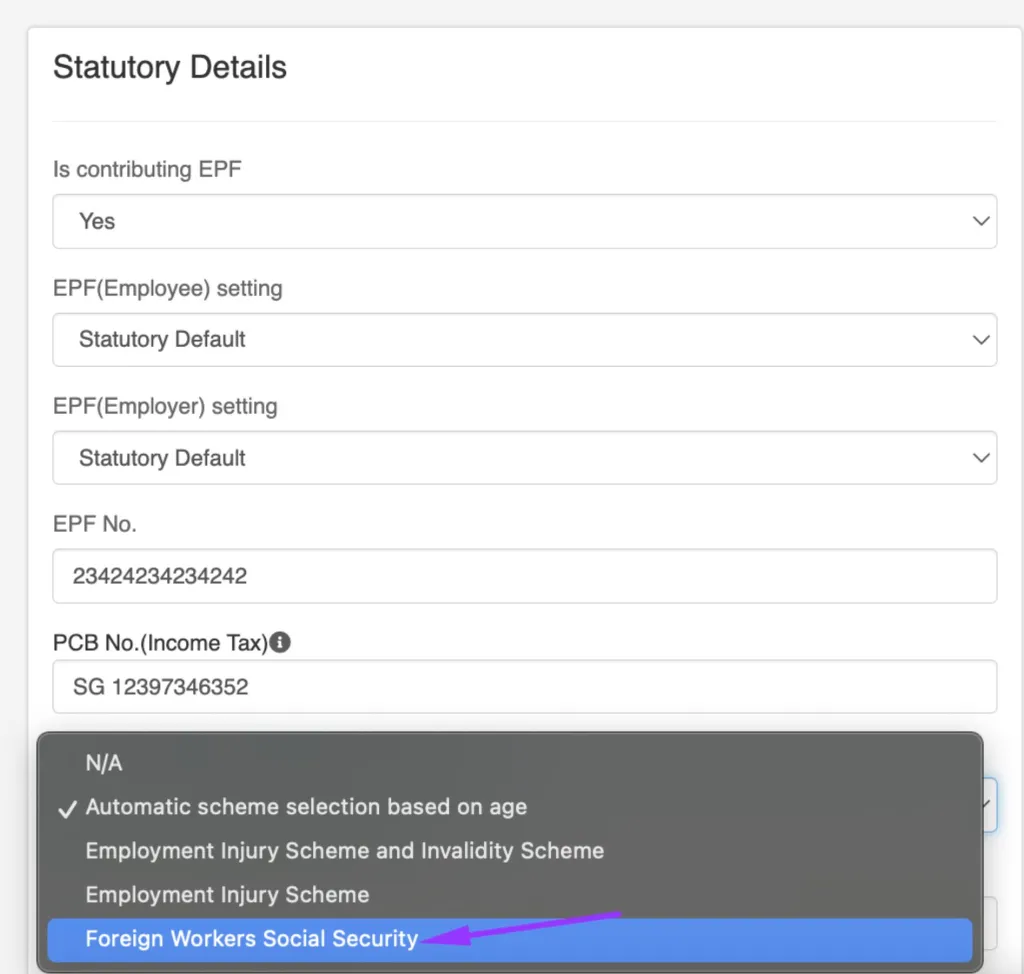
For non-Malaysian employees, SOCSO calculations are now automated under the Foreign Workers Social Security (FWSS) scheme. Talenox ensures contributions are calculated based on the correct category, so you don’t have to worry about it.
What You Need to Do
- Go to the employee’s profile and open the Statutory Details section.
- Under SOCSO Contribution, select Foreign Workers Social Security (FWSS).
- Double-check that the employee’s Date of Birth is accurate--this field is essential for correct calculations.
How the FWSS Scheme Works
Talenox will automatically place employees into the appropriate category:
- 1st Category Contribution: For employees under 55 years old, which includes both:
- Employment Injury Scheme
- Invalidity Scheme
- 2nd Category Contribution: For employees 55 years and older, which includes:
- Employment Injury Scheme only
Whether your employees are joining the PERKESO scheme for the first time or continuing past retirement age, this update ensures SOCSO contributions are accurate and compliant.
2. Splitting MBMF Contributions: Now Supported
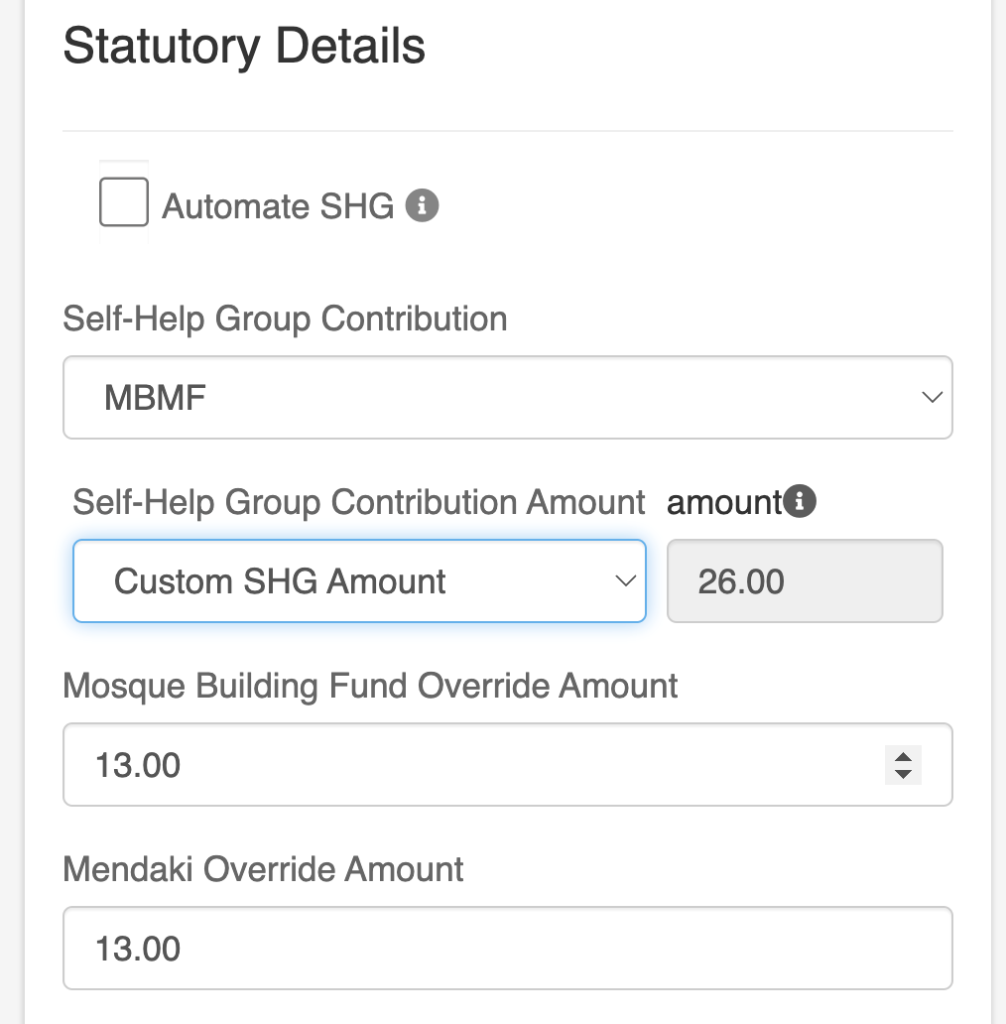
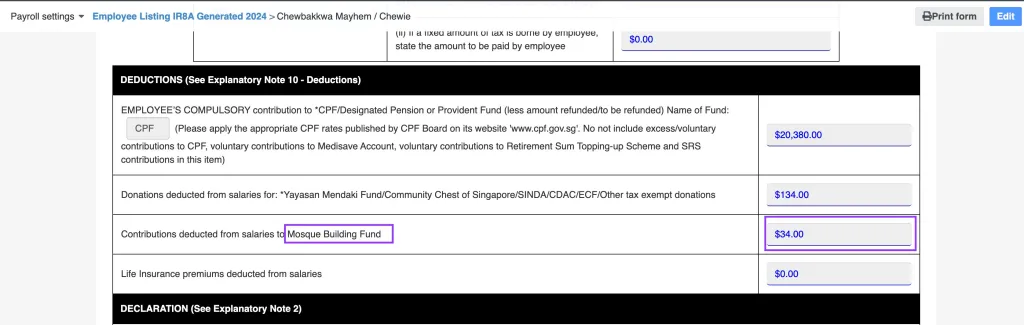
Great news for Singapore users! Managing self-help group contributions just got even better. You can now split contributions between Mendaki and the Mosque Building Fund (MBMF) directly in Talenox.
How It Works
- Go to the employee’s profile and open the Statutory Details section.
- Under Self-Help Group Contribution, select Custom SHG Amount.
- Enter the specific amounts for Mendaki and MBMF in the respective fields.
IR8A Integration
Once the amounts are entered, Talenox will automatically reflect the contributions in the employee’s IR8A form. This means you don’t need to manually adjust or calculate these amounts during tax season--it’s all done for you.
3. Rest Day: A New Working Day Type
We know that not every business operates on a Monday-to-Friday schedule, so we’ve added a Rest Day option in the Working Day Settings.
By default, Sunday is marked as the rest day, but you can change it to any day of the week to fit your team’s needs.
How to Set It Up
- Go to Company Details and open the Working Day Settings section.
- Select the day you’d like to set as the rest day.
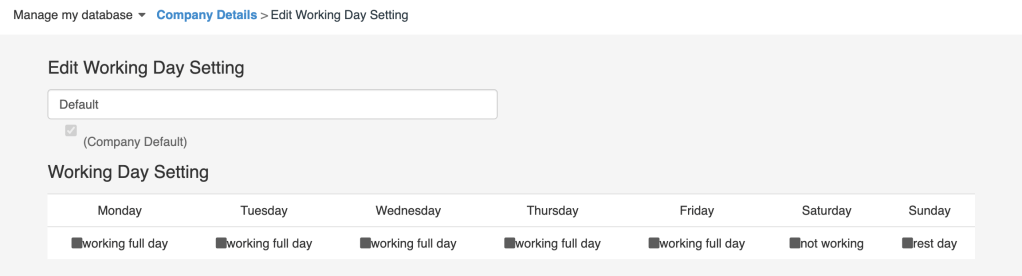
This feature is especially useful for businesses like retail or F&B, where employees might have different rest days compared to the typical weekend.
Key Details
- This setting is purely for scheduling purposes and does not impact the employee’s rate of pay or existing leave settings.
- The flexibility allows you to manage diverse work schedules while keeping everything organised.
4. Updated Overtime Rates for Malaysia
We’ve updated our overtime pay calculations for rest days and public holidays to ensure they align with Malaysia’s Employment Act 1955. A big thank you to one of our users who brought this to our attention--your feedback helps us improve!
Here’s how overtime is now calculated in Talenox:
Rest Day Overtime (Follow Normal Working Hours)
For employees paid on a monthly or weekly rate:
- Work not exceeding half of normal hours: 0.5 day’s wages at the ordinary rate of pay.
- Work more than half but not exceeding normal hours: 1 day’s wages at the ordinary rate of pay.
For employees paid on a daily or hourly rate:
- Work not exceeding half of normal hours: 1 day’s wages at the ordinary rate of pay.
- Work more than half but not exceeding normal hours: 2 days’ wages at the ordinary rate of pay.
Public Holiday Overtime (Follow Normal Working Hours)
For all employees, work on a public holiday now earns:
- 2 additional days’ wages at the ordinary rate of pay.
Need More Information?
For more details, you can refer to our Help Centre article on Overtime Rates. It provides a complete breakdown of overtime pay calculations and other related guidelines.
5. CPF Proration for Singapore PRs: Improved Accuracy
We’ve rolled out updates to make CPF proration for employees transitioning to Singapore Permanent Resident (PR) status more precise and user-friendly. These changes ensure accurate statutory contributions, whether viewed in-app or on exported reports.
UI Update for Year 1 CPF Proration
When an employee becomes a Singapore PR partway through the month, Talenox now prorates statutory contributions based on the statutory effective date. This change is clearly reflected in the employee’s profile, making it easy for you to manage mid-month transitions.
What You’ll See:
- Statutory contributions will be automatically prorated according to the date the employee’s PR status takes effect.
- The updated interface ensures proration is calculated correctly, so there’s no need for manual adjustments.
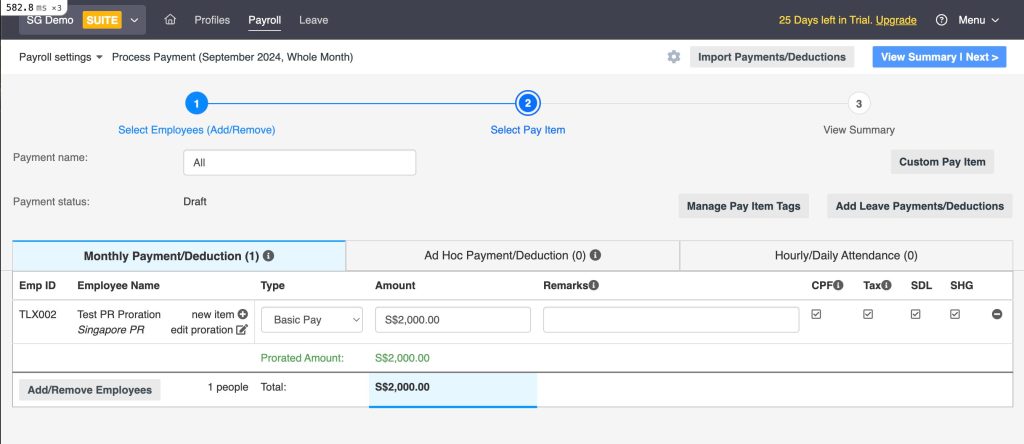
For more details on how CPF proration works, you can refer to our guide: Prorate CPF for PR Year 1 (PR1).
Rounding Proration Calculations to Two Decimal Places
To maintain consistency and accuracy, proration calculations are now rounded to two decimal places.
Why This Matters:
- Reduces discrepancies between in-app calculations and exported reports.
- Ensures uniformity across all payroll records, even for employees with complex proration scenarios.
Wrapping It Up
From automating SOCSO contributions to simplifying CPF proration, these updates are designed to make payroll management easier and more efficient. Whether you’re managing diverse teams or handling complex calculations, Talenox has you covered.
Stay tuned for more updates and tips in our blog--we’re always working on ways to make your HR and payroll experience even better!
Related posts:
![cpf ceiling changes 2026]()
CPF Changes 2026: What HR Managers Need to Know About the New $8,000 Salary Ceiling
28th Jan 2026![tale]()
Important: Talenox Pricing Changes Starting Today (January 5, 2026)
05th Jan 2026![ecf Sinda cdac mbmf shg talenox]()
ECF/SINDA/CDAC/MBMF Singapore Donation Fund Contribution Rates (Updated for: 2026)
02nd Jan 2026![IR8A Simplified for Employers (2026 ed.)]()
IR8A Simplified for Employers (2026 ed.)
12th Dec 2025![How to File IR8A Online: From Pushing Paper to the Click of a Button]()
How to File IR8A Online: From Pushing Paper to the Click of a Button
11th Dec 2025![How to Recognise and Recover from Burnout at Work]()
How to Recognise and Recover from Burnout at Work
10th Dec 2025