
 Talenox
 Introducing the New Pay Item Schedule: Simplify Your Payroll with Ease!
At Talenox, we’re always looking for ways to make your HR and payroll experience better. This time, we’ve got some exciting news to share – a brand-new feature called the Pay Item Schedule! Thanks to the hard work of our talented engineers, we’re bringing you a tool that’s going to make handling temporary allowances and deductions super easy.
What’s the Pay Item Schedule?
The Pay Item Schedule lets you set up temporary payments or deductions for your employees. Whether it’s a special project bonus or a loan repayment, you can schedule it to be included in their pay automatically. Here’s what it can do:
- Temporary Allowances: Got an employee working on a special project with extra pay? You can set it up so they get that extra pay only during those months.
- Loan Deductions: Need to deduct loan repayments from an employee’s salary over a few months? You can schedule that too!
- Prorated Pay Items: Automatically adjust payments based on when an employee joins or leaves during a pay period.
Key Features
- Available for SUITE Users: This feature is available for our SUITE users in Talenox.
- Two Ways to Update:
- Manual Edit: You can manually create, update, or delete a pay item schedule.
- Excel Import: Bulk import schedules using an Excel file to save time and reduce errors.
How to Access the Pay Item Schedule
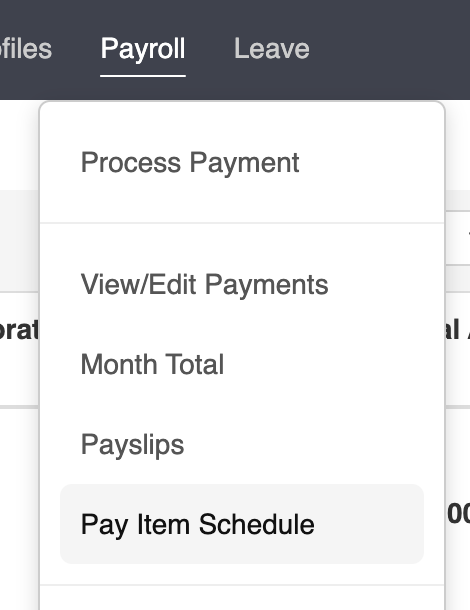
You can find the Pay Item Schedule in the main navigation bar.
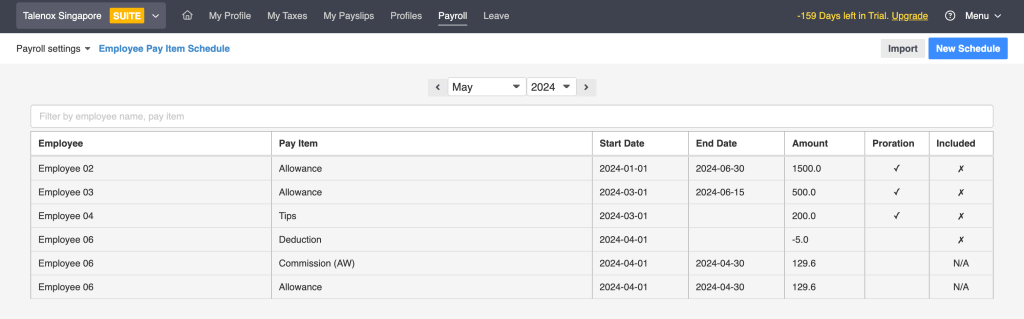
The main page shows all your scheduled pay items and lets you know if a pay item has already been included in that month’s payment.
Manual Edit
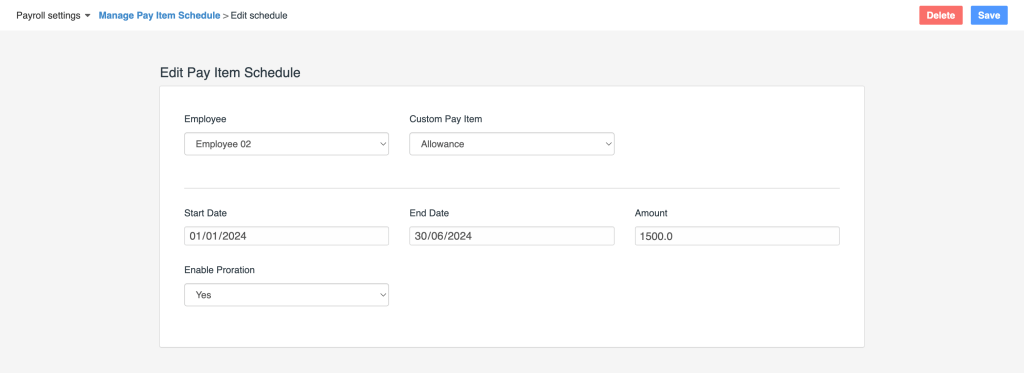
To manually edit a pay item schedule:
- Go to Pay Item Schedule in the navigation bar.
- Click on New Schedule.
- Fill in the details for the employee, pay item, start date, end date, and amount.
- Click Save to add the new schedule.
Here’s a look at the manual edit interface:
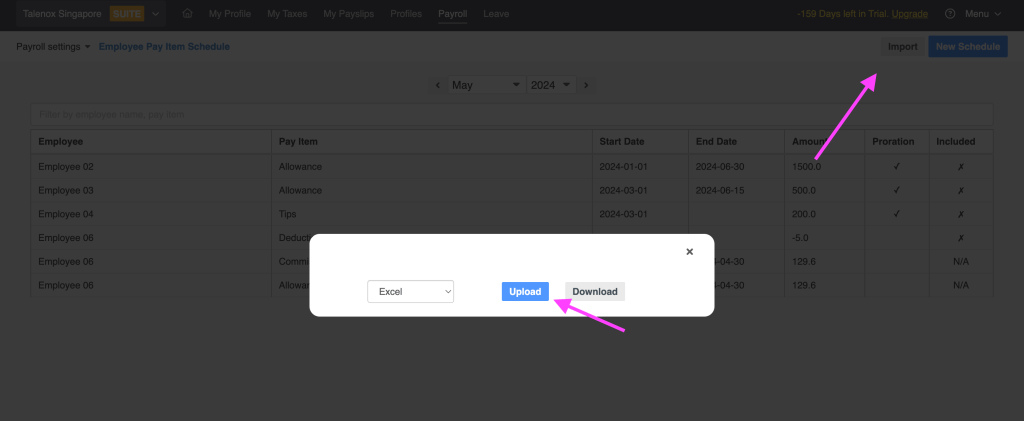
For those who prefer working with spreadsheets, you can easily bulk import your pay item schedules using an Excel file:
- Go to Pay Item Schedule in the navigation bar.
- Click on Import.
- Upload your Excel file with the pay item schedule details.
Here’s how the import interface looks:
Important Points to Remember
- Unique Pairings: Each employee-pay item combo must be unique. If “Employee 02” and “Allowance” pair exist, you cannot create another same pairing. Importing the same combo will overwrite the current one. If you use manual New Schedule, you won’t be able to save it and will see an error warning message.

- Supported Pay Items: Only recurring pay items are supported right now. Ad Hoc and Attendance categories are not included.
- Date Requirements: A start date is a must, while an end date is optional. If you don’t set an end date, the pay item will continue to be included until the employee leaves or an end date is added.
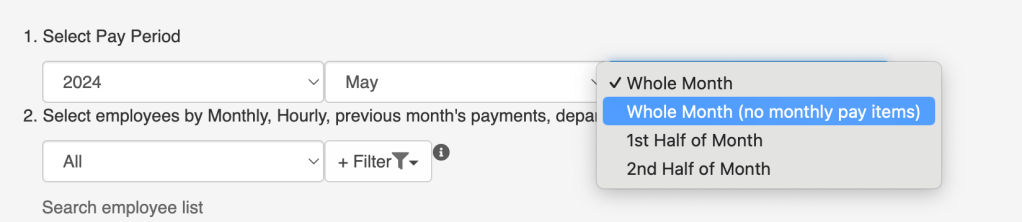
- Whole Month Exclusion: You can use the Whole Month (no monthly pay items) option to exclude a scheduled pay item from being included.
- For example, if you want to give an employee a one-time bonus in January and they are selected for this payment, the scheduled pay item will be included only once in January.
Why You’ll Love the Pay Item Schedule
This feature is designed to make your life easier. Imagine not having to remember to add or remove temporary allowances manually every month. The Pay Item Schedule takes care of it for you, ensuring accuracy and saving you time. Plus, you can use it to manage multiple scenarios:
- Temporary Bonuses: Perfect for projects, seasonal bonuses, or any temporary incentive.
- Scheduled Deductions: Great for managing loan repayments, temporary salary adjustments, or any other deductions that need to be spread over time.
- Seamless Transitions: Automatically adjust pay items when employees join or leave, making sure their pay is always accurate.
Get Started Today!
The Pay Item Schedule is here to make your payroll management smoother and more efficient. It’s available exclusively for our SUITE users, so give it a try and see how much easier it makes your life.
And That’s Not All!
While this Pay Item Schedule is our major update for this quarter, rest assured we’re working on more exciting features and improvements to make Talenox even better. Stay tuned for our next quarterly update, where we’ll bring you more tools and features to make your HR management seamless and efficient.
As always, we love hearing from you! Your feedback helps us improve. Don’t hesitate to share your thoughts and suggestions with us.
Happy scheduling and see you in the next update!
Even though this is our only update this time, stay tuned! We’re constantly striving to improve and make your Talenox experience better. Watch out for more exciting features in the future!
Want to stay updated on all things Talenox? Check out our other articles for more tips, updates, and insights!
Related posts:
![hr outsourcing finance]()
HR Outsourcing for Hong Kong's Finance & Fintech Sector: Compliance and Scale
27th Mar 2026![HR outsourcing Malaysia SME]()
Malaysian SME Growth Guide: When & How to Outsource Your HR (With Checklist)
18th Mar 2026![Singapore Budget 2026 SME Guide: Everything You Need to Know]()
Singapore Budget 2026 SME Guide: Everything You Need to Know
09th Mar 2026![employee appreciation day]()
Creative Ideas for Employee Rewards That Actually Work
02nd Mar 2026![Talenox Q4 2025 Product Updates: Built for a Smoother 2026]()
Talenox Q4 2025 Product Updates: Built for a Smoother 2026
27th Feb 2026![paternity leave shared parental leave singapore]()
2026 Update: What Changed for Paternity & Parental Leave in Singapore?
26th Feb 2026